WHY KREO WILL MAKE YOUR CONSTRUCTION ESTIMATES ACTUALLY WORK
In the next five minutes, you’ll learn how to slash your pre-construction takeoff time by 80% while virtually eliminating the manual entry errors that kill profit margins. In my 15 years navigating the SaaS landscape, I’ve seen countless "automation" tools that are little more than glorified spreadsheets. Kreo, however, represents a shift toward genuine AI utility. While heavyweights like Autodesk Revit focus on the deep architectural modeling side of the house, Kreo targets the high-pressure world of bidding and estimating, providing a cloud-native sanctuary for quantity surveyors who are tired of clicking every single corner of a floor plan.
★Step 1: Establishing Your Digital Command Center
Getting started with Kreo doesn't require the steep hardware investments typical of legacy BIM software. Since it’s cloud-based, you’ll begin by creating your workspace and uploading your primary project files—Kreo handles PDFs, CAD files, and even standard images with surprising grace.
The first thing you’ll notice is the interface: it’s built for the modern web, not stuck in the 2000s. Once your files are uploaded, use the "Scale" tool immediately. This is the foundation of everything; without an accurate scale, your AI-powered measurements will be useless. Simply draw a line over a known dimension on your plan to calibrate the workspace.
★Step 2: Leveraging the AI "Easy Buttons"
To move from "slop" to quality, you need to master the three pillars of Kreo’s automation:
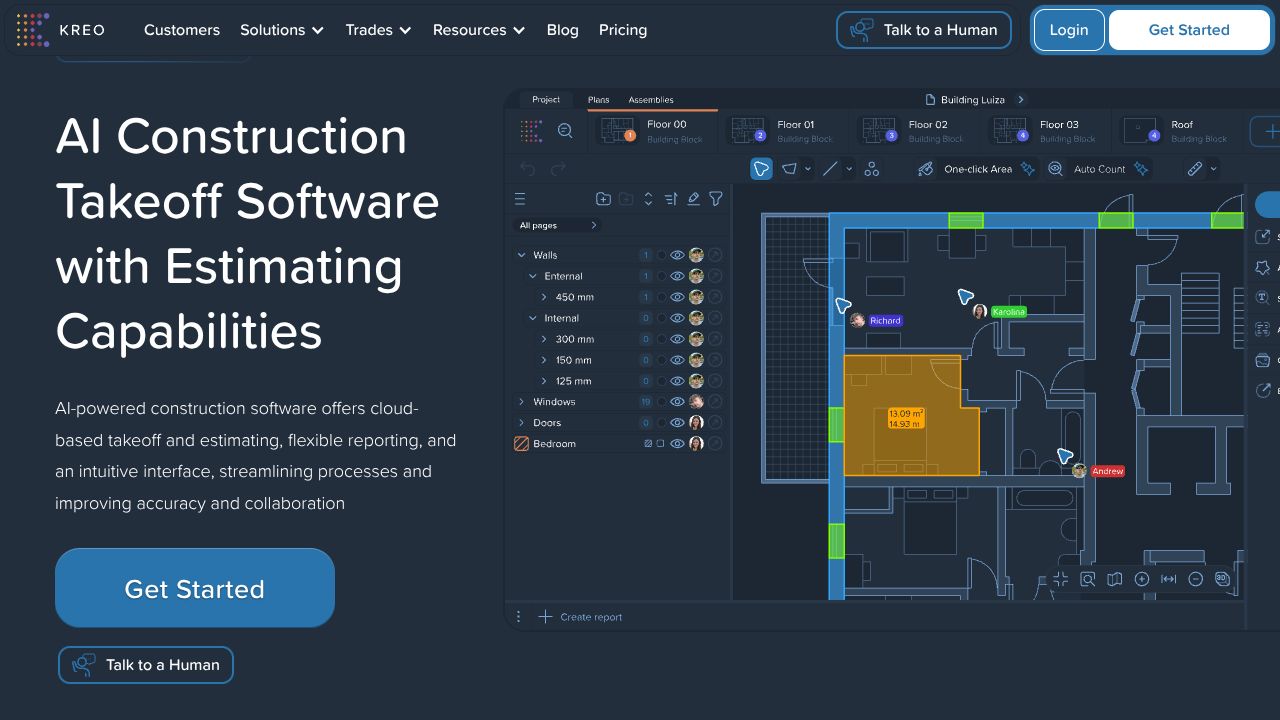
- One-Click Area: Instead of manually tracing the perimeter of a room, hover over a space. Kreo’s AI detects the boundaries automatically. One click, and you have your square footage.
- Auto Count: This is the "Slop Alert" killer. If you need to count 200 specific light fixtures or doors, select one instance as a "search pattern." Kreo will scan the entire document and highlight every match.
- Auto Measure: For more complex structures, the AI can suggest measurements for entire floors. It’s a massive leap forward compared to the manual drafting required in tools like Archicad.
★Step 3: Architecting Your BOQ (Bill of Quantities)
The real magic happens when your measurements meet your money. Don't just take measurements; link them to "Assemblies." An assembly is a recipe—for example, a "Partition Wall" assembly might include studs, drywall, tape, and paint.
By linking your "One-Click Area" measurements to these assemblies, Kreo dynamically generates your Bill of Quantities (BOQ). If the client changes the floor plan, you update the measurement, and your entire cost plan ripples with the change. This live-link capability is something I’ve seen teams struggle with for years in siloed environments; here, it’s native.
★Common Mistakes to Avoid
- The "Set and Forget" Trap: AI is a co-pilot, not the captain. Always run a manual spot-check on Auto Count results, especially in messy or low-resolution PDF scans where symbols might overlap.
- Ignoring the Naming Convention: In a cloud-collaborative environment, "Measurement_1" is useless. Establish a naming convention for your layers and folders from day one so your field team actually knows what they’re looking at.
- Skipping the Assembly Database: Many users treat Kreo like a simple ruler. If you don't take the time to build out your customizable assemblies and cost rates, you're only using 20% of the platform's power.
★How It Compares to the Giants
Kreo sits in a unique spot in the AEC (Architecture, Engineering, and Construction) ecosystem. If you are looking for deep, coordinated MEP fabrication detailing, Trimble SysQue is the industry standard for those working inside the Revit environment. Similarly, for full-scale architectural design and 3D visualization, Archicad offers a level of creative control that Kreo doesn't aim to replicate.
However, where Autodesk Revit can feel overly complex and "heavy" for a quick bid, Kreo is nimble. It’s built specifically for the estimator. While the big BIM tools are about how to build it, Kreo is about how much it costs and how long it takes to count. It fills the "quality gap" for teams that need to bid 10x faster without hiring five more surveyors.
★Conclusion: Is Kreo Right for You?
If your team is still manually clicking points on a PDF or wrestling with disconnected spreadsheets, you are operating in the "slop" zone. Kreo is a premium alternative for construction professionals who value speed and accuracy over legacy workflows.
At $175/month for the Pro version, it’s an investment, but if it saves your senior estimator 15 hours a week (which it will), the ROI is a no-brainer. If you’re a quantity surveyor or a contractor looking to dominate the bidding phase, Kreo is the high-quality pick you’ve been waiting for.
✨ END OF BROADCAST ✨
🚀 READY TO EXPERIENCE THE FUTURE?
VISIT KREO →